
Resource pack issues
Fabulously Optimized supports various OptiFine features, including resource pack extras. However, the implementation differs from mod to mod and some resource packs are accepted in OptiFine even if they are broken, so this page should help you fix some of those issues.
Before trying any of those things here, though, make sure you are using the latest version.
Broken paths
If you see this message while activating a resource pack:
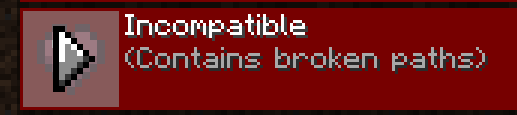
This means the resource pack maker is using spaces or other non-standard characters in the file or folder names.
If this is the case, the modpack will warn you and allow overriding it, but note that various glitches may occur (miscolored or invisible blocks, lightning issues, broken textures...).
To fix that, please tell the resource pack maker to only use the following characters in file/folder names: a-z0-9._-.
Custom entity models
Or "mobs with a custom shape".
4.7.0 and newer
FO is now using a different mod that should have more compatibility. Fresh Animations latest version is seamlessly supported, though it's addon may not be.
If the entities are missing parts of their body, try this:
Click
ModsSearch for "Entity Model Features", click the config button (top right, above
Issues)Set "Substitute missing model parts" to
YesClick
Save changesandDone
Issues and workarounds are tracked on the mod's Discord, in the channel #emf-issues.
4.6.0 and earlier
Partly supported. Resource packs that should work are discussed here (cem#9)
For Fresh Animations, try this version with the instructions below (discuss any issues here).
If your resource pack's entities are supported but are still not displayed correctly, you can try this:
Click
ModsSearch for "Custom Entity Models", click the config button (top right, above
Issues)Set "Use model creation fix?" to
NoClick
Save & QuitandDoneIn your world, hold down
F3(andFnon laptops), pressTYou'll see a short loading screen. After that, check if the models are displayed correctly.
If they still are not, set that setting back to
Yesand disable your resource pack, wait for CEM to implement them.Or if you want to continue using your resource pack without the models, disable the optifine setting in CEM to essentially disable the mod.
See also: a list of supported entity types and features.
Invisible blocks
This may occur when the pack is using broken paths and is trying to change the models of some blocks, like chests.
Enhanced Block Entities
Enhanced Block Entities is the mod that makes various blocks faster on latest versions of FO. Some optimizations may not be supported by your resource packs, so here's how to configure it:
Click
ModsSearch for "Enhanced Block Entities", click the config button

Enable "Force Resource Pack Compatibility"
If that doesn't help or the option is not visible, disable any blocks that seem broken to you. Usually disabling
Enhanced Chestsis enough.
Click
Done
Better Beds and FastChest
Some versions of FO include these mods instead.
Beds:
Close the game
Remove or disable the Better Beds mod from your launcher.
Start the game and see if it is fixed.
Chests:
Click
ModsSearch for "FastChest", click the config button
Disable the mod, click
Done.
Lighting problems
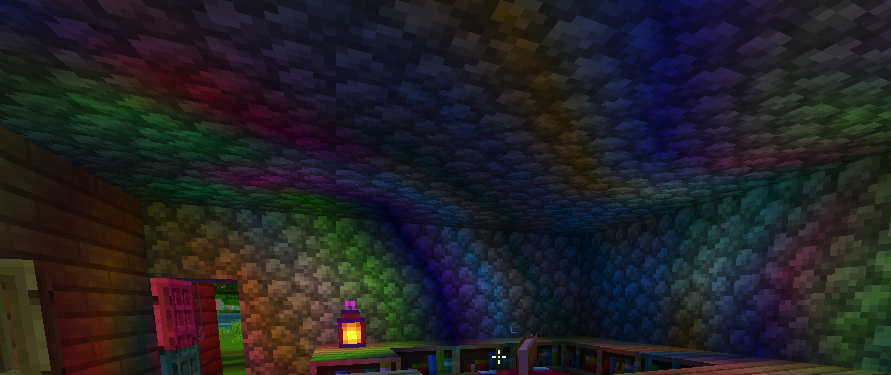
If you are seeing problems with lighting, such as flickering light sources or lights of random colors, try disabling Colormatic.
Last updated