
Changed options
Fabulously Optimized changes some default options of Minecraft to improve your gameplay.
Because the pack is using YOSBR, the options will only change if you do not have options.txt or mod-specific files in config folder already, e.g. by using a clean profile. That also means you can freely update the pack without losing your settings!
Options
snooperEnabled
Toggles Snooper, the legacy analytics service
true
false
Just in case you use the same profile on MC 1.13 or older, to improve privacy. The setting was removed in 1.13 but it still exists in options (and defaults to enabled) for some reason, hence the change.
operatorItemsTab
Shows operator-only items in a Creative inventory tab, when you have operator access (/op)
false
true
It is useful and it only appears when you have the permission for it, so it's weird Mojang even made it an option
darkMojangStudiosBackground
Makes the splash screen black and white
false
true
Black background is less intrusive than red, partial Bedrock Edition parity
simulationDistance
Redstone and mob spawning distance
12
6
Better performance regardless of the rendering distance you use
guiScale
Size of the menu and interface elements
0
3
3 is more usable on most screens, 0 (Auto) can get too large on Full HD and larger screens
maxFps
The maximum framerate
120
260
260 means "unlimited", this is changed for better UX when VSync is disabled by the user (on fast computers/monitors)
resourcePacks
Adjusts which resource packs are enabled by default
[]
¹
Enabled mod-provided and FO-exclusive resource packs by default
advancedItemTooltips
Enables "debugging" tooltip rows on items - item ID and durability
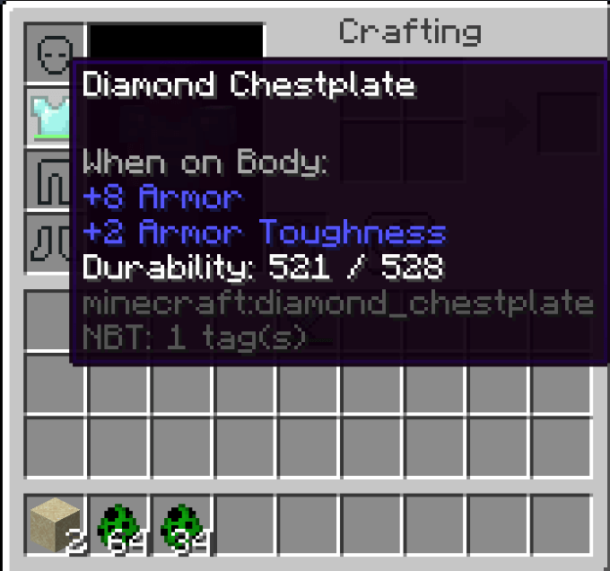
false
true
These are useful for much more than just "debugging" - using any commands, getting exact durability value, learning English, etc. Plus, this toggle is not visible in vanilla options so many people may not even know about it.
tutorialStep
The next step of tutorial hints
movement
none
If you know how to install a modpack, you probably don't need those tutorials anymore
skipMultiplayerWarning
Whether to skip the legal disclaimer when opening the multiplayer screen

false
true
I expect my users to already know that the third party servers are not owned or monitored by Mojang Studios or Microsoft. A more relevant warning is added to Realms by No Chat Reports.
joinedFirstServer
Whether to display the hint for Social Interactions
false
true
I expect my users to already know that Social Interactions can be opened with P; the screen is easily discoverable by the "Player Reporting" button
telemetryOptInExtra
Sets the telemetry (analytics data collection) toggle to "minimal".
false
false
While "minimal" is the default right now anyway, it may not always be the case, hence the enforcement by FO. Debugify is used to disable it entirely though, so this is also just a fallback.
onboardAccessibility
Indicates whether the user has not seen the accessibility onboarding screen
true
false
Minecraft already has an easily accessible accessibility button in the main menu, this screen just creates annoyances for the majority who don't need it
¹ ["vanilla","fabric","continuity:glass_pane_culling_fix","continuity:default","file/SodiumTranslations.zip","file/Mod Menu Helper.zip","file/Chat Reporting Helper.zip","file/Fast Better Grass.zip"] Changed mod settings can be found on the repo at .../yosbr/1.20.1/config.
Keybinds
Vanilla: Save Hotbar Activator
Saves your hotbar if this key and a number key are held
c
none
This key is more often used for zoom
Zoomify: Zoom
Zooms the view when the key is held
v
c
This key is more often used for zoom
Zoomify: Secondary zoom
Activates the secondary zoom option
F6
none
Not needed for most players
AntiGhost: Reveal ghost blocks
Asks the server to send blocks around you in order to un-glitch you
g
none
Accidental presses and holding can cause issues, use /ghost instead
Iris: Reload Shaders
Reloads the applied shaders
r
none
Not needed for most players
Iris: Shaderpack Selection Screen
Opens the shader selection screen
o
none
Not needed for most players
Iris: Toggle Shaders
Disables or enables shaders
k
none
Not needed for most players
FabricSkyboxes: Toggle mod
Disables or enables custom skyboxes
Numpad 0
none
Not needed for most players
Resource packs
Fabulously Optimized enables relevant mod-provided resource packs and bundles some resource packs for better experience.
Mod Menu Helper (FO-exclusive) - explains what each mod does in a consistent and clear way on Mod Menu
Chat Reporting Helper - explains chat reporting in a clear way by simplifying vanilla and No Chat Reports tooltips and No Chat Reports icons
Fast Better Grass - imitates OptiFine's "Better Grass" (fast mode)
Translations for Sodium - adds unofficial translations for Sodium (video settings)
The resource packs use minimal resources, can be translated to your language and they will not change the look of your blocks, items, menus etc.
Fixed bugs
Fabulously Optimized includes some mods that fix vanilla bugs. Similar to the mod inclusion policy, they must be meaningful to 70%+ users to get enabled (e.g. FPS drops, crashes, platform-specific annoyances...).
"Received unknown passenger" - Entities with differing render distances as passengers outputs error
If you'd like to enable more bugfixes for your game, see the fixed bug list for Debugify.
Requesting a bugfix
Want to get a bug fixed in Fabulously Optimized? Here's what you'll need to do:
Find the actual bug in Mojang's bug tracker
Request it or look at its status on Debugify's bug tracker
Once implemented (or confirmed to be) in Debugify, request an option change in FO
Describe the bug, mention the mod that fixes it and why it is important to 70-80% of users
If accepted, expect the fix to be enabled in the next version of FO :)
Configuring mods
The modpack is already configured for the best performance and simplest experience for most users.
If you want to configure something, you'll most likely find it on Options... → Video Settings.... If you have a powerful computer or monitor, you may want to disable Vsync there.
For other things like dynamic lights, better grass and zoom:
Click
ModsRead the descriptions of the mods to see what they do
If the pencil is blue, you can configure the mod by clicking the config button

If you don't see any pencils, you don't have the Mod Menu Helper resource pack enabled for some reason. Click
Done→Options...→Resource Packs...→⏵on "Mod Menu Helper.zip" →Done→ go to point 1 of this tutorial
If you need to disable a mod, see this wiki page.
If you have more questions about the mods, chat with us on Discord!
Last updated